Click Overview
Click is a Python package for creating composable command-line interfaces with little code, sensible defaults, and configurable behavior. It is intended to make writing command-line tools quick while avoiding friction when implementing a CLI API.
Click exists because there is not a single command-line utility for Python that combines nesting, composability, POSIX-oriented parsing, prompting, environment-variable support, file handling, and common terminal helpers.
Sources: README.md:3-12, docs/why.md:3-16
Core concepts
Composable command-line applications
A composable CLI is one whose commands can be nested.
Click highlights arbitrary command nesting, automatic help generation, and lazy loading of subcommands as its three defining capabilities.
| Capability | What it provides |
|---|---|
| Arbitrary nesting | Commands can form nested command-line structures. |
| Automatic help | Click can generate help pages from command metadata. |
| Lazy subcommands | Subcommands can be loaded at runtime. |
Sources: README.md:14-19
Decorator-based command construction
A decorator-based CLI lets a normal Python function become a command object by attaching command and parameter metadata around the function.
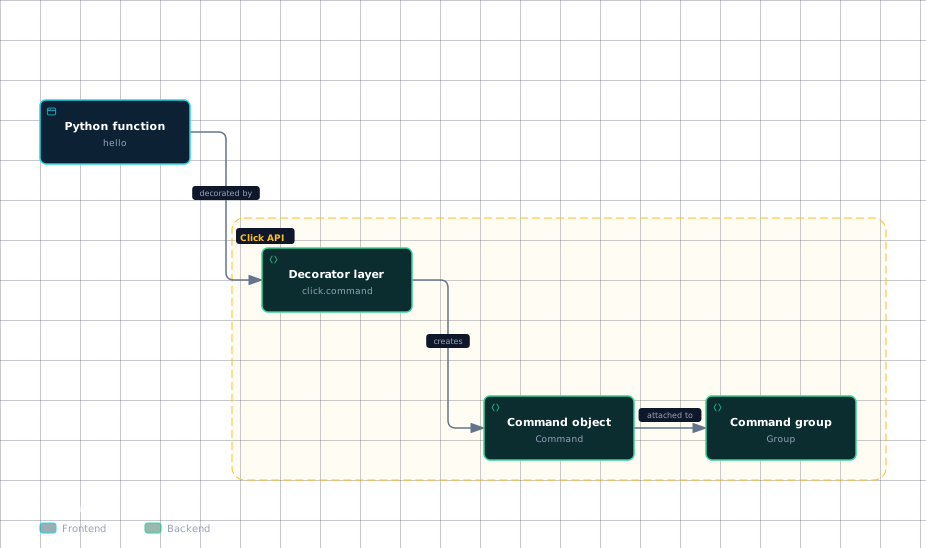
click.command creates a Command, uses the decorated function as its callback, and attaches decorated option and argument parameters.
The resulting object can be invoked as a command-line utility or attached to a Group.
Sources: src/click/decorators.py:173-188, src/click/decorators.py:182-188
Controlled parsing and dispatch
Click parses arguments itself rather than using argparse, because argparse makes arbitrary command nesting difficult and has deficiencies around POSIX-compliant argument handling.
Click also avoids argparse because its option-versus-argument guessing is problematic for incomplete command lines, and because it cannot disable interspersed arguments safely enough for nested parsing.
The low-level parser is intentionally simpler than argparse; higher-level Click classes provide features such as types and defaults.
The following architecture shows how the documented decorator surface leads to a command model and then to nested composition.
Evidence
- python-functionREADME.md:26
- decorator-layerREADME.md:26
- decorator-layersrc/click/decorators.py:173
- command-objectsrc/click/decorators.py:173
- command-groupsrc/click/decorators.py:182
Sources: docs/why.md:17-23, docs/why.md:35-45, src/click/parser.py:225-232, src/click/decorators.py:173-188
How a function becomes a working command
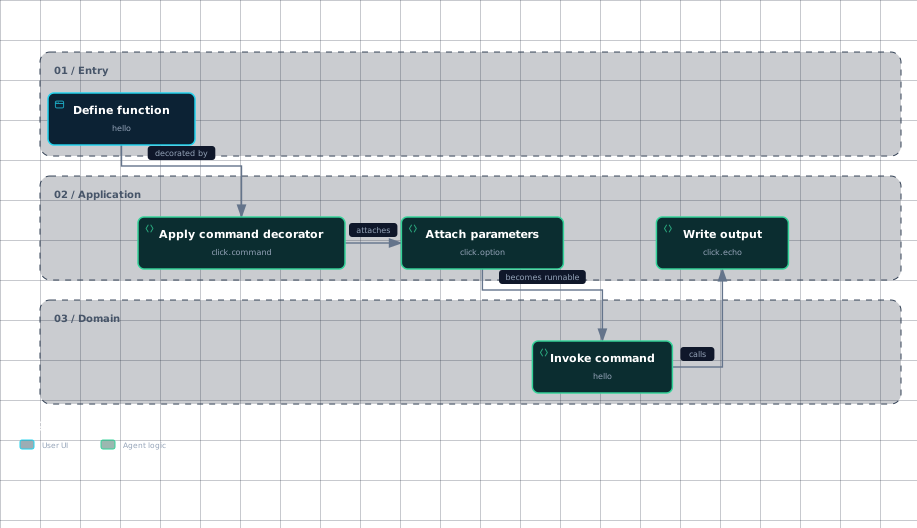
The source-level starting point is a plain function decorated with click.command, followed by click.option declarations that describe command-line inputs.
click.command uses the function as the callback and automatically attaches decorated options and arguments as parameters; after decoration, the function name refers to a Command instance rather than only the original function.
Click derives a default command name from the function name by lowercasing it, replacing underscores with dashes, and removing selected command-related suffixes.
The example’s hello command receives count and name, loops according to count, and writes each greeting through click.echo.
A command can then be called in the module’s __main__ block, which is the visible application-side execution entry in the example.
This workflow traces only the call order shown in the supplied examples: decorate the function, produce the command object, and call the resulting command from the program entry point.
Evidence
- define-functionREADME.md:26
- apply-commandREADME.md:26
- apply-commandsrc/click/decorators.py:173
- attach-parametersREADME.md:27
- attach-parameterssrc/click/decorators.py:173
- invoke-commandREADME.md:34
- write-outputREADME.md:30
Sources: README.md:21-35, src/click/decorators.py:173-188, src/click/decorators.py:177-180, README.md:26-35, README.md:34-35
Where execution starts in the source tree
For orientation, begin with src/click/decorators.py to understand how a function becomes a Command; the supplied decorator implementation explicitly defines that transformation.
Then read src/click/core.py for the command model and dispatch-related behavior. The shown src/click/core.py excerpt demonstrates a command name being read from arguments and passed to get_command, including a normalization retry when the first lookup fails.
That excerpt places subcommand lookup inside the core command machinery, while the example places the application’s first visible call at hello() in the __main__ block.
Read src/click/parser.py after the core model when you need the argument-tokenization layer; its documented role is to parse options and arguments underneath the higher-level Click classes.
The package initializer is useful for compatibility orientation rather than primary command execution: its __getattr__ dynamically supplies deprecated names such as BaseCommand, MultiCommand, OptionParser, and __version__, and raises AttributeError for unknown names.
Sources: src/click/decorators.py:173-188, src/click/core.py:2119-2129, README.md:34-35, src/click/parser.py:225-232, src/click/init.py:76-144
How it connects
Start with Repository Layout and Dev Setup to locate the repository’s source tree and establish a working environment.
For the end-to-end version of the decorator example, continue to Quickstart: Your First Command.
To understand the object created by the decorator, read Commands and Groups and The Decorator API.
For the values supplied by click.option and click.argument, follow The Parameter Model, Parameter Types, and Arguments and Options in Practice.
For the lower-level parsing boundary, read The Low-Level Parser; for the execution state passed through nested commands, read Context and Execution.
For help generation and user-facing failures, continue to Help Text Formatting and Exceptions and Error Handling. The source locations behind this reading path are the decorator, core, parser, and initializer excerpts cited above.
Sources: src/click/decorators.py:173-188, src/click/core.py:2119-2129, src/click/parser.py:225-232, src/click/init.py:76-144
Key takeaways
- Click provides composable command-line interfaces with nesting, generated help, and runtime subcommand loading.
- It deliberately does not build on
argparse, because Click needs different nesting and parsing behavior. - click.command turns a decorated function into a
Commandand attaches decorated parameters. - The visible application entry in the example is
hello()underif __name__ == '__main__'. - The first source files to read are src/click/decorators.py, src/click/core.py, and src/click/parser.py, in that conceptual order.
Sources: README.md:14-19, docs/why.md:17-23, docs/why.md:35-45, src/click/decorators.py:173-188, README.md:34-35, src/click/core.py:2119-2129, src/click/parser.py:225-232